How do I upgrade from free trial to Pro plan immediately?
Last updated: February 3, 2026
Context
You want to end your free trial and upgrade to a Pro subscription (monthly or annual) right away, rather than waiting for the trial to expire naturally. This allows you to access Pro features immediately and stop the trial period.
Answer
To upgrade from your free trial to Pro immediately, follow these steps:
Sign in to the CodeRabbit app (https://app.coderabbit.ai) and select your organization
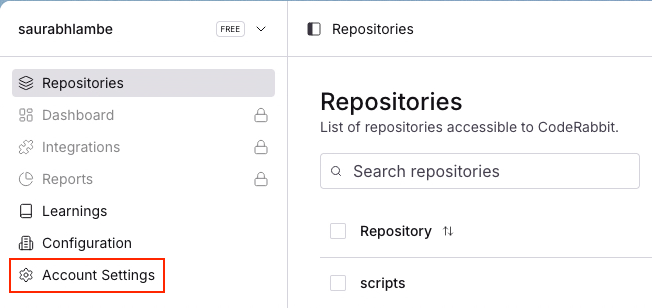
Navigate to Account Settings > Subscriptions and Billing.
Click on Upgrade Plan.
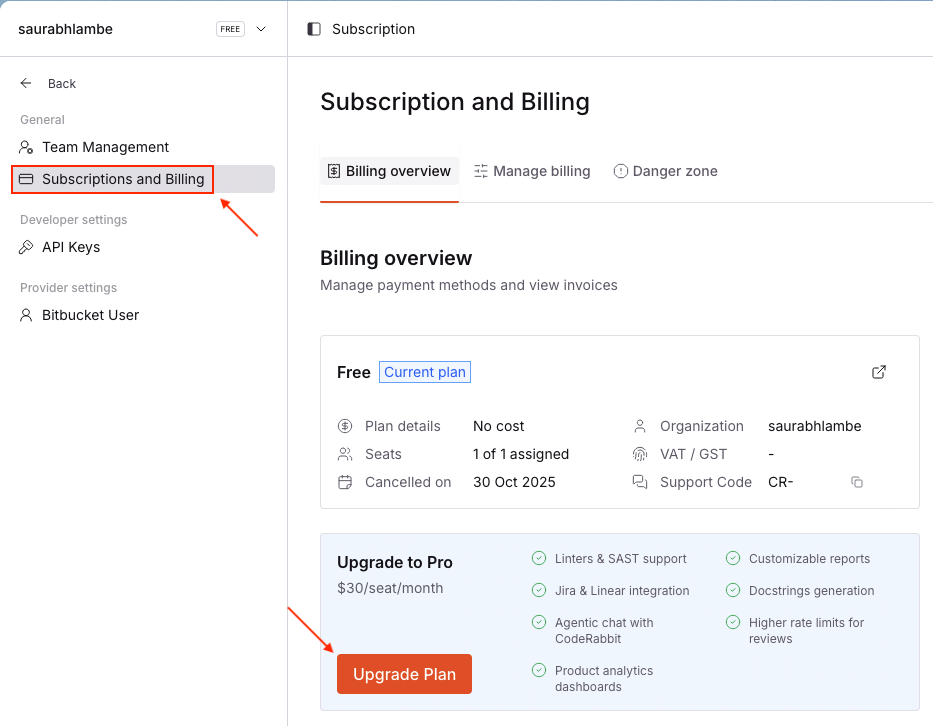
Select either Pro (monthly) at $30/developer/month or Pro (annual) at $24/developer/month
Confirm with Update or Update Subscription.
The upgrade takes effect immediately and will end your trial period. Changes are prorated based on your billing cycle.
Important notes:
Only organization Admins or Billing Admins can make subscription changes
If you don't see the upgrade options, try disabling your ad-blocker or using a different browser, as ad-blockers can sometimes interfere with the subscription management interface
For more detailed information, refer to the Subscription Management guide and Pricing page.